How to Enhance Website Security with OTP SMS?
Looking for a higher security level for your website? Use SMS-based OTPs to verify your users and add protection to your WordPress site.
Leverage OTP SMS for your WordPress website login.
As digital technologies advance, the digital threats also increase. One of the most repeated threats we’re struggling with these days is password cracking.
Malicious hackers use multiple methods to hack the passwords of users to enter their accounts and use their information or steal their money.
Although strong passwords can limit these threats, they’re not enough. So what to do?
Thanks to simple SMS features, you can increase the security of your website and protect your users’ information and money.
The two-factor authentication method using one-time passwords can add an extra layer of protection to your website.
In this blog post, we’ll help you understand what OTP SMS verification is and how you can use it to enhance the security of your website.
What is an OTP SMS?
OTP stands for One-Time Password, and an OTP SMS is a message that contains a temporary code for verification.
The OTP is generated by a system and sent to users’ mobile numbers. Of course, OTPs can be sent using other channels like email, but SMS is the most personal and reliable channel for verification. An OTP SMS can verify your users’ identity during login or sensitive transactions.
The main differences between an OTP and a traditional password are:
- OTP is dynamic and can be used once, while you can reuse traditional passwords.
- OTP is time-bound and must be used within a limited period.
In fact, OTPs are only valid for a single authentication session for a few minutes after generation. These features increase the security of the login process because hackers don’t have much time to hack the password or access the mobile device.
Fortunately, the process of OTP SMS authentication is really straightforward. When a user attempts to log in to your website or take an action like making a purchase, the system generates a random code.
Then, the SMS system sends the code to the user’s mobile number. Finally, the user should enter the code within minutes to verify their identity and continue the action.
This is a popular form of two-factor authentication (2FA). As you know, traditional login methods rely solely on something the user knows, like a password.
However, OTP verification uses something more than the main password to prove the user is the registered person with the same mobile number.
The benefits of OTP SMS verification for websites
Here are the advantages of using OTP SMS verification for your website:
Improving security against unauthorized access
As said earlier, OTP SMS enhances the security of your website and your users. All passwords can be hacked, no matter how complex they are. So, traditional passwords leave user accounts vulnerable.
A time-sensitive OTP helps you ensure that even if your main password is compromised, attackers still cannot access the account. This method significantly reduces the risk of account takeovers, fraud, and data breaches.
Increasing user confidence and trust
When users see that you use OTP SMS verification for your website, they feel that your system is more secure and trustworthy than other businesses.
This is especially important for businesses that rely on numerous transactions, like e-commerce websites, banking platforms, and SaaS applications.
Improving compliance with security standards
If you want your business to remain compliant with data protection rules like GDPR and PCI DSS, you’d better use OTPs.
Implementing OTP-based two-factor authentication shows your commitment to safeguarding user data. This way, you can avoid penalties and legal fines in the future.
How to implement OTP via SMS for WordPress?
To have an effective OTP system for your WordPress website, you need to follow the steps below:
Step 1: Choose an SMS gateway
You have to choose a suitable SMS gateway to connect your website to mobile operators. Consider your budget, location, and other requirements when selecting an SMS gateway.
If you’re running an international business, you have to go for SMS providers that support multiple countries, like:
- Twilio
- Plivo
- Clickatell
- Sinch
Step 2: Install WSMS
To use the SMS gateway on your website, you need extensive programming knowledge. Fortunately, there are SMS platforms that make this process considerably easier.
Look at the following table to see some of the best SMS tools that support OTP messaging on WordPress:
| Plugin | SMS Gateways | Features | Ease of Use | Pricing | Best For |
|---|---|---|---|---|---|
| WSMS | 300+ | Registration, Login, Password Reset | High | Free / Paid | Multi-country sites |
| miniOrange OTP | 100+ | SMS & Email OTP, WooCommerce | Medium | Free / Paid | Advanced 2FA |
| WP 2FA | Twilio, Nexmo | SMS, Email, TOTP | High | Free / Paid | Simple 2FA |
| OTP Login | 100+ | Login, Registration, WooCommerce | Medium | Free / Paid | E-commerce, Membership |
| Rublon 2FA | Limited | SMS & App OTP, Admin Alerts | High | Free / Paid | Small websites |
WSMS is the best SMS tool for WordPress websites that supports SMS gateways around the world. It offers advanced features, like OTP, automation, scheduling, WooCommerce integration, etc.
You can easily install it, like this:
- Go to your WordPress dashboard
- Open Plugins
- Click Add New
- Search for “WSMS,”
- Tap “Install”
- Activate the plugin
Step 3: Configure the SMS gateway
Go to WSMS’s Settings and select the SMS gateway you want to use. Now, you need to enter the API credentials that the SMS gateway gave to you to configure the SMS gateway on your WordPress dashboard.
Step 4: Enable OTP verification
After setting up your SMS plugin, you need to enable the 2FA & Login Add-on, which is powered by OTP SMS.
To use this feature, go to your dashboard and select Settings. Then, click on 2FA & Login and activate the options you want:
- Login with SMS
- Two Factor Authentication with SMS
Step 5: Customize OTP messages
WSMS offers customizable SMS templates for OTPs. You can include placeholders like the code, user name, full name, site name, etc.
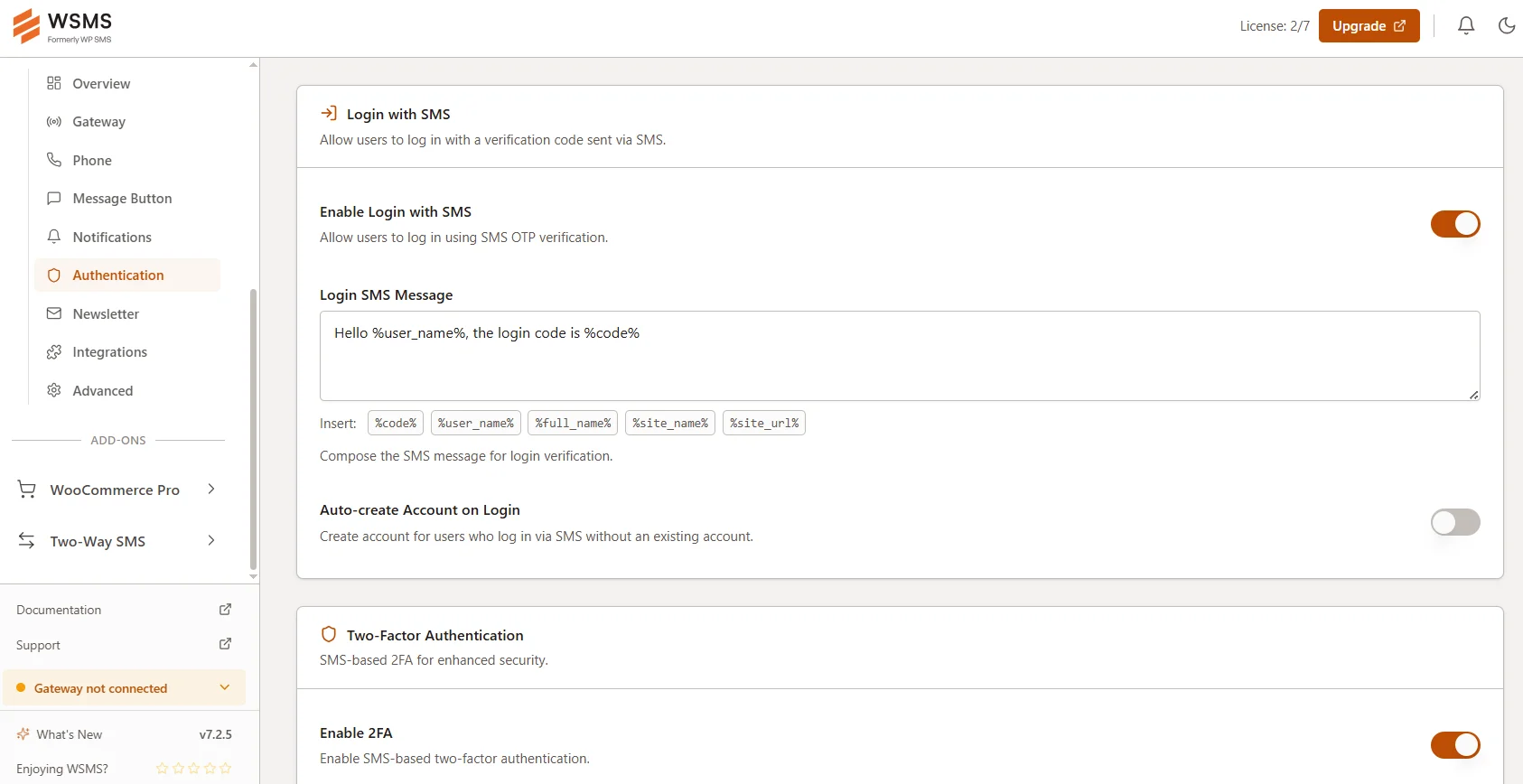
This way, the SMS will be personalized to make recipients feel more secure. For example, you can write something like:
“Hi Sarah, your verification code is 123456. It expires in 5 minutes.”
Step 6: Test before running
Try to use the 2FA feature several times and check if the OTPs are delivered correctly. This is essential before you activate the features for all users.
Limitations of OTP authentication
Despite all the benefits of OTP SMS verification, it has some drawbacks. It’s good to know the following limitations before using this system for your WordPress website:
SMS delivery issues
Users can only use an OTP SMS within minutes. So, if the user doesn’t receive the SMS within this limited time, it expires, and the user can’t use it to log in to their account.
Although SMS is a reliable channel, sometimes you might face network congestion, carrier restrictions, or geographic limitations. These problems might cause delays or prevent messages from reaching users. That’s why some businesses offer backup methods like email-based verification.
Cost considerations
As you know, SMS gateways charge you per SMS, and therefore, SMS-based OTPs increase your operational costs. This is especially significant for websites with a large user base. So, try to consider this cost before implementing the OTP SMS system.
Stressful for some users
Some users may find the OTP process inconvenient. Some of them think that the limited usage period might be stressful, particularly if they are in areas with poor mobile connection.
Lower security than app-based OTP
OTP SMS can be intercepted by some malicious methods, like SIM swapping or phishing. So, although it’s more secure than traditional passwords, it still has some risks.
Conclusion
A two-factor authentication system using OTPs can significantly enhance your website’s security.
Although they are simple, they can add a strong extra layer of protection to your users’ information.
You just need to pay for an SMS gateway and use a smart SMS platform like WSMS on your WordPress dashboard. Then, you can create customizable SMS templates and automate OTP SMS verification without being an expert.
So, why wait? If you want to make your users’ data secure, enable this feature on your website.
Frequently asked questions
Is SMS OTP 2FA?
Yes! SMS OTP is a common form of two-factor authentication. In fact, you have to enter a time-sensitive code along with your main password to enter your account on a website/application.
Why is SMS OTP not safe?
SMS OTP can be intercepted through SIM swapping or phishing. So, SMS-based OTP is usually less secure than app-based authentication.
Is OTP an SMS?
No. OTP (One-Time Password) is a temporary code, and SMS is just one method used to deliver it.
Why am I receiving SMS OTP on my mobile?
You receive an OTP SMS when you try to connect to a service that wants to verify your identity.